There are two kinds of AI assistant, and the difference between them is not intelligence. It’s not model size, benchmark scores, or how humanlike the writing feels. The difference is one question: when you ask it something, what is it looking at?
Kind one is looking at the internet — or more precisely, at a frozen distillation of it. Ask about your business and it answers from patterns learned across everyone’s businesses, which is to say: from nobody’s. Kind two is looking at your data — your actual revenue, your actual calendar, your actual customer activity, as of right now.
Kind one is a very well-read stranger. Kind two is an analyst. This post is about what it takes to build kind two, and what changes when you have one.
The reading list is the product
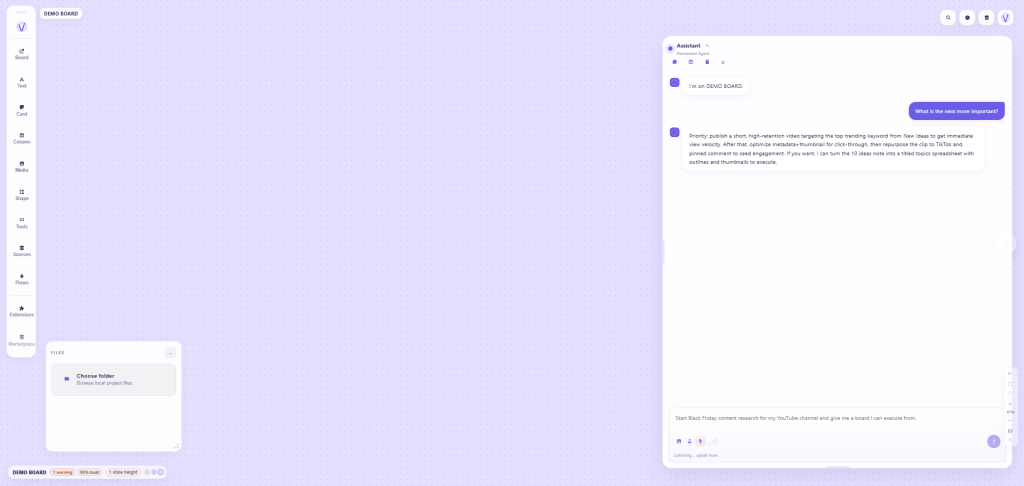
Vexlynk’s agent lives inside a spatial workspace where your business data is already assembled — that’s the architecture, and everything else follows from it. When you ask the agent a question, here’s what it can actually see:
- Your live source cards. The connected feeds on your canvas: Stripe revenue, Shopify orders, Google Calendar, Analytics traffic, HubSpot contacts, Notion databases, WhatsApp conversations, your YouTube channel’s stats. Not summaries you wrote about them — the current data itself.
- Your work. The notes, to-dos, documents, and spreadsheets on the canvas. The agent knows what you’re working on because it can see what you’re working on.
- Standing intelligence. Vlynks — intelligence modules that read your board and write an analysis card, run from the card, on request, or on a daily or weekly schedule you set; the agent reads each one’s latest run. Institutional Memory, the default one, remembers decisions and history so the agent knows what happened before this conversation.
- The conversation itself. Threads are kept per workspace, so context accumulates where the work lives instead of evaporating between chats.
Equally important is what it can’t see: workspaces you’re not in, sources you haven’t connected, anything beyond what you’ve put on the desk. When an answer would require data you haven’t connected, it says so — which sounds like a limitation and is actually the feature. An agent that admits “I can’t see your ad spend” is an agent whose other answers you can trust.
What grounded answers look like in practice
The difference shows up in texture. Same questions, both kinds of assistant:
“How’s revenue this month?”
Kind one: “To assess revenue, consider comparing month-over-month trends and examining seasonality…” — a lecture on how someone would answer, if they could see anything.
Vexlynk Assistant: reads the Stripe card and tells you the number, the trend against last month, and the day that spiked. Ten seconds, zero tabs.
“What should I focus on this week?”
Kind one: universal productivity advice, applicable to a bakery or a hedge fund.
Vexlynk Assistant: reads your calendar card (two heavy days), your to-do card (three overdue items), and your sources (the channel’s new video is outperforming) — and answers about this week, the one you’re actually in.
“Did anything change since yesterday?”
Kind one: cannot, in principle, answer. There is no “your yesterday” in its world.
Vexlynk Assistant: the sweep across every card, delivered in three sentences. This one question, asked each morning, replaces the entire dashboard tour — and it’s the question people end up using most.
Not just answers: hands
Because the agent inhabits the workspace rather than a chat sidebar, it can do more than reply — it can build where you work:
- Create cards. “Summarize this week into a note” produces an actual note, on the canvas, next to the data it summarizes.
- Place and run sources. “Track that YouTube channel” places the source card and fetches its data — additive, visible, immediately useful.
- Organize. Arrange and group what’s there; assemble a starting layout from a description when you’re facing a blank canvas.
- Generate real drafts. Documents — proposals, scripts, checklists — created from a description with your workspace data in view, landing as editable cards. The agent writes the first version; you write the final one.
One design decision matters more than any capability: the agent asks before it changes your work. Placing a new card happens directly — it’s additive and obvious. Modifying or removing something you made triggers a confirmation, every time. The line is drawn at destructiveness, not complexity: it’ll happily build an elaborate layout unprompted, and it will always ask before touching a card of yours. Trust in an agent with hands comes from knowing exactly when the hands wait.
The three questions to ask any “AI for business” product
This category is crowded with kind-one products wearing kind-two marketing. Three questions cut through every pitch, ours included:
- “What exactly can it read, and how fresh is that data?” If the answer involves you uploading files or pasting context, it’s kind one with homework. The reading list should be live connections, current today, visible to you.
- “What happens when it doesn’t know?” Kind one fills gaps with plausible fluency — the most dangerous failure mode in business advice. Kind two says “that’s not on the canvas.” Ask the vendor what an honest gap looks like; if they can’t show you one, worry.
- “Where does my data live, and who else’s model feeds on it?” The right answers: locally by default, sync opt-in, connections read-only except for card actions you take yourself (sending, archiving, completing or deleting asks you to confirm first), and — if you want full control — bring your own AI key so requests run under your provider relationship and your billing. Those are Vexlynk’s answers on the desktop app (the web workspace keeps boards in the cloud); they should be table stakes anywhere.
Two follow-ups belong on that list. First: “What stops text inside my data from giving the AI orders?” An agent that reads emails, web pages and files can be handed instructions hidden in that content. OWASP calls this indirect prompt injection, and prompt injection is the first entry in its Top 10 for LLM applications. A good answer names what the agent can’t do without your say-so. Vexlynk’s answer: source actions such as a WhatsApp reply only happen when you do them yourself, and a reply asks you to confirm before it sends, and the agent asks before it changes or removes anything you made. Second: if you want a neutral structure for judging any AI vendor, NIST’s AI Risk Management Framework is free and written for voluntary use. For a longer list of questions, including what happens to your data, see how to actually use an AI assistant for your business.
Links checked September 28, 2026.
Why this compounds
The subtle advantage of kind two isn’t any single answer — it’s the trajectory. A generic chatbot can remember what you tell it, but in month six it’s no closer to your live numbers than in minute one. An agent sitting on your workspace gets better three ways at once: you connect more sources (wider view), the Vlynks accumulate more history (deeper memory), and your canvas grows into a richer model of how you think (better context). Same model, compounding desk.
That’s the quiet reframe this whole category needs: stop shopping for a smarter oracle, and start building a better-informed one. The intelligence was never the bottleneck — the reading list was.
Standing intelligence: Vlynks that read your board on your schedule
Everything so far describes an agent that answers when you ask. The layer above that is intelligence you can put on a schedule — and it’s where the desk architecture pays its biggest dividend.
Vlynks are installable intelligence modules that read the cards on your board and write you an analysis. Each one runs from its card, when you ask the agent for it by name, or on a daily or weekly schedule you set. Every run writes an analysis card on your board, with each finding cited to the cards it came from, and the agent reads each Vlynk’s latest run — so its answers get sharper because the reading was done between your questions. A few of the twelve available:
- Institutional Memory (installed by default) — remembers decisions, context, and history across your workspace, so the agent knows what happened before this conversation. The reason next month’s answers are better than this month’s.
- Morning Brief — assembles what changed across your sources into one summary; schedule it daily and the first question of the day is already answered when you ask it.
- Opportunity Detector — looks for revenue, lead and retention openings in the cards on your board, each with a confidence level, the expected outcome and one action.
- Client Health Monitor — the quiet-client alarm: slipping engagement and relationships needing attention, noticed by something that never gets busy.
The mental model: the agent is a colleague you talk to; Vlynks are the reading that colleague did before the meeting. Every account starts with Institutional Memory alone — intelligence you didn’t ask for, watching data you didn’t choose, is a bad default — and the rest are opt-in from the Marketplace.
Trust, but verify: reading the contract
An intelligence module that reads your data and shapes what your agent tells you deserves more scrutiny than a name and a tagline. So every Vlynk publishes an intelligence contract you can open before installing: what it does in plain language, the actual reasoning prompt it applies to your data — not a summary, the instruction itself — and its data access as two lists: what it reads, and what it cannot reach.
That second list is the one worth reading. A revenue-watching module stating plainly that it cannot see your calendar is a stronger privacy statement than any policy page — because it’s an architectural fact, published and view-only, not a promise. If you’ve ever wished you could read the system prompt of the AI tools you use: here, you can. That transparency standard is worth demanding from the whole category. The Vlynks docs list all twelve and what each contract shows.
Talking to it like a person, because you can
Mundane but daily-life-changing details of the interface itself: you can speak to the agent instead of typing — there’s a voice button, and on desktop a configurable wake word, so “hey, what changed today?” works from across the room with your hands full. You can attach images and files to a question and the agent reads them as part of it — a screenshot of a competitor’s pricing, a supplier’s PDF, dropped into the conversation next to your live data. And conversations are kept per workspace, with history you can return to — so the client-A workspace’s agent isn’t confused by the client-B workspace’s context. Small things, until you’ve used them; then their absence elsewhere is what you notice.
Month one, honestly
What adopting this actually looks like: week one, you connect sources and ask test questions you already know the answers to — calibration, entirely rational. Week two, the morning “what changed?” becomes routine and the dashboard tour quietly dies. Week three, the first join question pays off — the video-to-sales one, usually — and you install a second Vlynk because now you know what the reading is worth. Week four, you catch yourself asking the agent something before checking any source directly, which is the moment the architecture has actually replaced the habit. No single day feels dramatic. The compounding is the product.
Vexlynk is free to start: connect your first sources, put your data where an agent can read it, and ask the morning question — “what changed?” — to something that can actually check.
Vexlynk
Vexlynk Team