Introducing Vexlynk, a spatial workspace where your business data connects, your files stay in sight, and everything finally makes sense together. The one-line version: connect anything, see everything, act with intelligence. The rest of this post is what those six words actually mean — shown, not declaimed.
The problem we refused to accept
Running a small business in 2026 means your operation is scattered across ten to fifteen apps. Payments in Stripe. Store in Shopify. Schedule in Google Calendar. Content stats on the platforms. Projects in Notion or Trello. And your files — the proposal, the contract, the brand assets — buried somewhere in a folder tree you have to spelunk through every time you need them.
Every one of those tools is competent. None of them can see the others. And so the most important job in your company — assembling the full picture — is done by you, in your head, on a tour of dashboards and folders, every single morning.
The industry’s answer has been either “buy another dashboard” (now you tour nine) or “get enterprise BI” (five figures and a consultant). We think both miss what a small operator actually needs: not more reporting — one place where the business is visible, current, and thinkable.
Connect anything
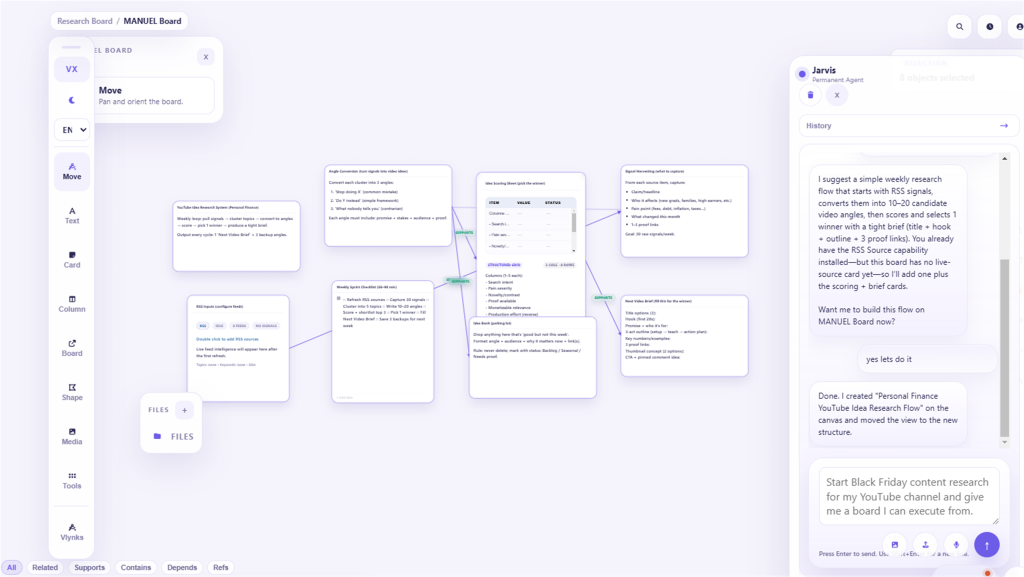
Vexlynk connects to the tools where your business already happens and turns each into a live card in your workspace — money in Stripe and Shopify, time in Google Calendar, Calendly, and Outlook, attention across Google Analytics and your YouTube data (Google Business Profile is coming soon), relationships in HubSpot and beyond, and the open web through RSS and site signals.
Connections take minutes — an OAuth consent or a pasted read-only key — and most bring data in without ever writing back; a few (WhatsApp, Trello, ClickUp, Google Calendar) let you act from the card, only when you do it yourself — sending a message, or archiving, completing or deleting something, asks you to confirm first. Your card shows your revenue; nothing can touch it. Keys are stored encrypted, and the catalog keeps growing: the sources page lists all 23 live sources and what’s coming soon.
See everything — including your own files
Connected sources land on an infinite workspace as cards. But live data is only half the story. Your notes, to-dos, documents, spreadsheets, charts, links, and files live on that same workspace, next to the data they’re about.
This is the part most tools miss. That document you saved somewhere. The link you pasted last week. The file eight folders deep. In Vexlynk you pin them to the board, next to the work they belong to — and they’re just there, in sight, one click to open, right where they live on your computer. No more digging through folders for something you know you saved.
And because it’s a workspace, the way you arrange it carries meaning. Money cluster here, this week there, the content pipeline down the side, the files for a project sitting beside that project. On an infinite board, the layout is the organization — related things sit together, so the comparisons your head used to compute happen by adjacency, passively, every time you look. Lists show you one thing at a time, sorted by someone else’s logic. A workspace shows you everything at once, sorted by yours.
Act with intelligence
Because your data and your work are assembled in one workspace, an AI agent can finally read it together — not answering from the internet, but from your cards. Ask “what changed?” and it reads your actual sources. Ask “did the launch work?” and it reads attention against revenue — the kind of join no single dashboard makes for you.
It acts, too: it creates cards, summarizes a cluster into a note, drafts a document with your real data in view, and helps you set up a starting layout. And it asks before touching anything you made — the line between “acts directly” and “confirms first” is drawn at destructiveness, because trust in an agent with hands comes from knowing when the hands wait.
Underneath the agent run Vlynks — installable intelligence modules that read your board and write an analysis card — run from the card, when you ask, or on a daily or weekly schedule you set. Institutional Memory (on by default) remembers your history so the agent never starts from zero; others assemble morning briefs, detect opportunities, and monitor client health. Each publishes a readable contract — including the reasoning it runs and the data it cannot access — before you install it. Intelligence you can audit, which we’d argue is the only kind worth installing.
The part we’re most opinionated about: it’s yours
Vexlynk is a desktop app for Windows and Mac, with a web companion — and the desktop app is local-first: your workspace lives on your machine. The web companion keeps boards in the cloud (here’s how the two differ). Cloud sync exists for multi-device work on Plus and Pro, and it’s opt-in, off by default. Most source connections are read-only, and the few that let you act do so only when you do it yourself (sending, archiving, completing or deleting asks you to confirm first). Linked files are referenced in place, never uploaded. And if you want the AI running under your own terms, BYOK support lets you plug in your own provider key and pay raw rates under your own agreement.
This isn’t a feature list; it’s a posture. Most software keeps your data because captivity is a retention strategy. We’d rather be kept by being useful. If we vanished tomorrow, your desktop workspace would still open on your machine — and we think that should be table stakes for any tool that holds the operating model of your business.
What using it actually feels like
The honest day one: download, sign in, connect your first source — Stripe, usually — and watch a card fill with your real revenue. Connect the calendar, the store, the channel. Drop in the files and links you reach for daily. Arrange it the way you think. Under an hour in, you ask the agent the question this product exists for: “Looking at all of this — what should I be paying attention to?”
The honest day thirty: the morning dashboard tour is gone, replaced by one glance and one question. The workspace has grown a work region — to-dos with due dates, notes beside the data they’re about, the files for each project pinned where you’ll actually find them, a document the agent drafted and you finished. Somewhere in week two you stopped thinking of it as a dashboard and started thinking of it as where the business lives. That transition is the product.
Pricing that starts at actually-free
The Free plan is a working product, not a demo: a full workspace, five live source connections, three Vlynks, and 50 AI turns a month — no card required, no clock ticking. Plus and Pro add more connections, more AI, more workspaces, and multi-device sync when you outgrow one machine. Details live on the pricing page, but the philosophy fits in a sentence: the free tier is sized to be genuinely useful forever, because a workspace you trust is the only marketing we believe in.
Where this goes
Today’s launch is the foundation: sources, canvas, agent, Vlynks, local-first architecture, and the desktop extensions that ship with it — a document editor, a code editor, and an in-app browser (a video editor and an image editor have joined them since). The roadmap runs in the direction the architecture points: more connections, deeper intelligence, and an agent that does more of the assembling for you. The thesis stays fixed while the surface grows — your whole business, on one workspace you own, with intelligence that reads it. For an up-to-date overview of what Vexlynk does today, read What Is Vexlynk?
We built Vexlynk because we were tired of being the integration layer of our own companies — the human middleware between eight dashboards and a dozen folders at seven in the morning. If that’s your morning too, it’s free to find out what the other kind feels like.
A few questions we keep getting
Is this a dashboard tool? No — dashboards are read-only reports with someone else’s layout. This is a workspace: your data and your work — notes, tasks, documents, files — on one surface you arrange, with an agent that can act there. The dashboard is a corner of what the workspace does.
Is this a Notion or Miro competitor? Adjacent, not overlapping. Whiteboards arrange static content; docs tools structure pages. Neither connects your Stripe and reads it live, and neither pins your real files and documents beside an agent grounded in your actual numbers.
What does setup honestly take? Download to first live card: about ten minutes. A working three-source workspace: under an hour, most of it OAuth consent screens. The agent is useful from the first connected card and gets sharper with each one after.
Mac or Windows? Both, from day one — plus the web companion for when you’re away from your machine (with sync enabled on Plus and Pro). Apple Silicon and Intel builds on the Mac side.
What if you shut down? On the desktop app, your workspace is a local database on your disk. It opens with or without us. That’s the architecture, not a promise — which is exactly why we lead with it.
Welcome
Products like this get built on the patience of early users — the people who connected real businesses to rough builds and told us exactly where it hurt. If you try Vexlynk this week, the single most valuable thing you can do is tell us the first question you asked the agent that it couldn’t answer well — because that gap is either a missing source, a missing Vlynk, or a missing capability, and all three are what we’re building next.
The source catalog grows continuously, and a few connections you might expect are still in review rather than in the product — if the one you need is missing, say so; the queue is ordered by exactly that.
Connect anything. See everything. Act with intelligence. Welcome to Vexlynk.
Vexlynk
Vexlynk Team